
Buying HubSpot is only step one. A portal without proper onboarding is just an expensive digital rolodex. Here is the exact 4-week implementation roadmap to get your team trained, your data mapped, and your portal live — plus the pre-work checklist most teams skip.
What Is HubSpot Onboarding?
HubSpot onboarding is the structured process of configuring your new portal, importing your data, building your first automations, and training your team to use the CRM as part of their daily workflow. Done right, your sales team trusts the data, workflows fire correctly from day one, and leadership has dashboards that actually reflect what is happening in the pipeline.
Most companies underestimate this phase. They buy HubSpot, do a basic data import, and expect results. Six months later, they have a messy portal with orphaned contacts, misfiring workflows, and reps who ignore the CRM entirely. Proper onboarding prevents this.
Before Week 1: Pre-Onboarding Checklist
Before any configuration begins, gather these items. Missing any one of them delays the project by days.
- Domain authentication credentials: You need DNS access to add SPF, DKIM, and DMARC records for your sending domain. Without this, every email HubSpot sends risks landing in spam.
- Clean contact export: Pull your current contact list from your CRM, spreadsheet, or email tool. Deduplicate it before importing — not after.
- Deal pipeline definition: Write out every stage in your sales process, what action defines each stage exit, and the win probability per stage. This is the foundation of your pipeline configuration.
- Team roster with roles: Know which reps get which HubSpot seats and what their daily workflow looks like. Training is role-specific and must be planned before go-live.
- Current tech stack list: Document every tool that needs to connect to HubSpot: email provider, calendar, LinkedIn, phone dialer, Slack, billing system. Each integration adds 2 to 4 hours of setup time.
Fixed-Fee HubSpot Implementation
Get your HubSpot implementation done in 4-6 weeks.
Pixiu X runs end-to-end HubSpot implementations for B2B teams. Fixed price, fixed timeline, no retainer required.
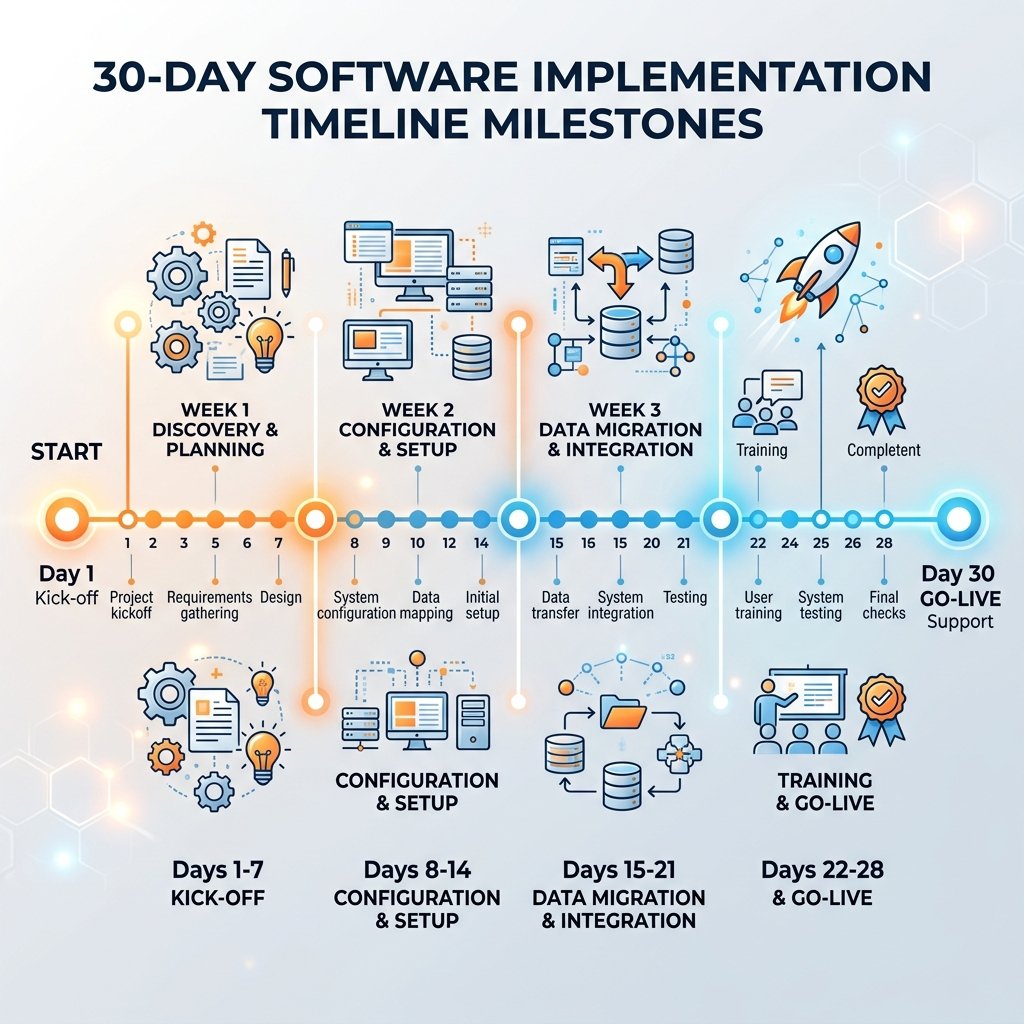
Week 1: Architecture and Technical Setup
Do not touch data import yet. Week one is entirely focused on plumbing. Every shortcut taken here creates problems in week three that take twice as long to fix.
- Email domain authentication: Add SPF, DKIM, and DMARC records to your DNS. Without these, your domain reputation is at risk and HubSpot will flag your portal as incomplete before any send.
- Tracking code installation: Install the HubSpot tracking code on every page of your website. Verify it fires correctly using the HubSpot Chrome extension. This activates page view tracking and chatbot functionality.
- Subdomain configuration: Set up a marketing subdomain (e.g., info.yourdomain.com) for landing pages and a separate email sending domain (e.g., email.yourdomain.com) to isolate marketing email reputation from transactional email.
- Custom properties design: Map every data point your sales process needs that does not exist natively in HubSpot. Design these before importing data — you cannot retroactively map imported fields to properties that do not exist yet.
- Email and calendar integration: Connect every rep's Google Workspace or Office 365 account so email activity logs automatically to contact records. This is non-negotiable for pipeline visibility.
- User permissions: Set up team roles and permissions. Sales reps should not have access to workflow editing. Define this upfront to avoid permission issues during training week.
Week 2: Data Migration and Pipeline Configuration
Now bring in the data. The import sequence matters: Companies first, then Contacts associated to companies, then Deals associated to contacts. Reversing this order breaks associations and creates orphaned records that require manual cleanup.
- Contact deduplication before import: Use HubSpot's native duplicate manager after a small test import to catch duplicates before they multiply across your entire database.
- Field mapping: Map every column in your export CSV to the correct HubSpot property. Pay special attention to phone number formats, date formats, and lifecycle stage values — these break most imports.
- Deal pipeline build: Create your pipeline stages with accurate win probability percentages. Add required exit properties to enforce data discipline: a deal cannot move to Proposal Sent without an Amount and a Close Date on the record.
- Historical activity import: If migrating from another CRM, import key activities (notes, closed deals, last contact date) so reps have context on their accounts from day one.
- Data validation: After import, spot-check 50 random contact records. Verify associations, lifecycle stages, and custom property values are populated correctly. Fix systemic errors at the source before they scale.
Need a guided HubSpot rollout?
Skip the learning curve. Book a free call and let our certified experts manage your entire HubSpot implementation.
Book a CallWeek 3: Automation and Sequences
This is where HubSpot pays for itself. With clean data and a working pipeline, you can now build automations that replace manual rep tasks and surface the right information at the right time.
- Speed-to-lead workflow: When a form is submitted, a task should be created and assigned to the rep within 5 minutes. Automate this immediately — response time is the biggest single predictor of conversion on inbound leads.
- Lifecycle stage automation: Define the exact conditions that move a contact from Subscriber to Lead to MQL to SQL. Build a workflow that fires automatically when those conditions are met. Never let lifecycle stages be updated manually by reps — the data becomes inconsistent within days.
- Deal stage notifications: Build internal alerts that ping the rep when a deal has not moved stages in 7 days. Stale deals kill pipeline accuracy and damage forecasting.
- Email templates and sequences: Build 3 to 5 email templates for the most common rep actions: first outreach, follow-up, meeting confirmation, and post-demo. Load these into sequences so reps have a starting point on every touchpoint.
- Meeting links: Connect every rep's calendar and create a HubSpot scheduling page. Embed it in email templates and the website contact page. Eliminate back-and-forth scheduling entirely.
Week 4: Team Training and Go-Live
The best CRM configuration fails if adoption is low. Week four is dedicated to role-specific training and a structured go-live. Never do a single all-hands training session — marketing, sales, and customer success have completely different daily workflows in HubSpot and need separate focused sessions.
- Sales rep training: Focus on the daily workflow: logging calls, creating tasks from the contact record, updating deals, and working the task queue. Reps should never need to navigate menus — their entire day happens from the contact and deal views.
- Marketing team training: Email campaigns, list segmentation, landing page builder, and the campaigns tool for attribution. Ensure marketing understands how their actions affect lifecycle stages and lead scoring.
- Manager and leadership training: Pipeline report, deal forecast, and activity reports by rep. Managers need to know how to run their weekly pipeline review entirely inside HubSpot without manual spreadsheet exports.
- Go-live checklist: Before flipping the switch, verify: tracking code is firing on all pages, deal pipeline required fields are enforced, at least one workflow is active, and all reps have confirmed their calendar and email are synced.
5 Common HubSpot Onboarding Mistakes
These are the mistakes that add weeks to an onboarding and cost companies data they never recover.
- Importing before domain authentication: If you send emails before SPF and DKIM are configured, you damage your sending reputation before you even start. Fix the plumbing first.
- Creating too many custom properties at once: Every property that is not actively used clutters the CRM and confuses reps. Build only what you need in month one. Add more after you see actual usage patterns from your team.
- Skipping lifecycle stage automation: If reps manually update lifecycle stages, the data becomes inconsistent within days. Automate lifecycle stage changes from day one based on concrete behaviors, not rep judgment.
- Training everyone at once: A 2-hour all-hands training covers nothing in depth. Role-specific sessions of 45 to 60 minutes produce dramatically better adoption rates than a single overview session.
- Going live without a data validation pass: Import errors silently corrupt your contact base. Always run a post-import spot check on at least 5% of records before enabling workflows that rely on imported data.
Frequently Asked Questions
How long does HubSpot onboarding take?
Standard HubSpot onboarding for an SMB runs 4 to 8 weeks. A basic setup covering contact imports, pipeline configuration, and core workflow builds takes 2 to 3 weeks. A full onboarding including custom properties, integrations, team training, and the first automated sequences takes 6 to 8 weeks. Enterprise onboardings with custom objects or complex API integrations can run 10 to 16 weeks.
What should be done in the first 30 days of HubSpot?
Prioritize foundations in the first 30 days: authenticate your sending domain, import contacts and companies with clean standardized data, configure your deal pipeline with required exit properties, set up your first lifecycle workflow, connect your primary integration, and train your sales team on daily CRM habits. Advanced workflows, reporting, and lead scoring should come in month two once the foundation is stable.
Do I need a HubSpot partner for onboarding?
Most SMBs benefit from a HubSpot partner for the technical configuration. HubSpot's own onboarding program is primarily check-ins and documentation — a certified partner does the actual builds in your portal. This is especially valuable if your team lacks in-house HubSpot expertise or if the portal needs to support a complex sales process with custom objects or integrations.
What is the difference between HubSpot onboarding and HubSpot implementation?
HubSpot onboarding typically refers to HubSpot's own paid program, which is coaching-based and does not include doing the actual portal configuration for you. HubSpot implementation refers to the full technical build-out performed by a certified Solutions Partner — custom properties, workflow builds, data migration, integrations, and training all included. Most companies need implementation, not just onboarding guidance.
How much does HubSpot onboarding cost?
HubSpot's own onboarding program ranges from $1,500 for Starter to $6,000 for Professional and higher for Enterprise. A certified implementation partner typically charges $5,000 to $25,000 depending on scope, with complex migrations and custom integrations at the higher end. The partner route is more expensive upfront but delivers a working portal instead of just guidance and check-in calls.
Don't launch your CRM blindly.
Partner with an agency that has successfully deployed hundreds of HubSpot portals for scaling SMBs.
Explore CRM Implementation